PowerWash Simulator VR
Bringing a 17-million-player console game to a mobile chipset — from an unstable 20 fps to a stable 90 fps on Meta Quest.
The challenge
PowerWash Simulator is a multi-platform game with 17 million players. It was designed for flat screens and console hardware. The job was to bring it to Meta Quest, a standalone headset running on a mobile chipset, without losing what makes it satisfying.
When I started, the game ran at an unstable 20 fps on the headset. In VR that isn’t a polish problem. It makes players feel sick.
My approach
I started out as a flexible one-person sub-team and owned the VR port end to end. The team grew with the project: one person for the first 18 months, two for the next six, and five for the final seven. The job was to port a flat-screen game’s systems, input and UX to VR, and then fit the whole thing into a standalone headset’s CPU and GPU budget.
- Port the whole game. I brought the existing game’s systems, input and UX across to VR, and implemented all of its diegetic UI (see below).
- Multiplayer. I implemented multiplayer in the VR version. It works the same way as in the base game: room-based co-op on Photon PUN2, server-authoritative. The main player opens a room and shares the room code with the others. It supports 2 players in career mode and 6 in free play.
- Cut nothing from the base game. The frame rate came from the renderer and the levels, not from removing content. I used Application SpaceWarp and Fixed Foveated Rendering, and put a lot of effort into optimising the VR levels: frustum culling, 360° environment captures, 2D sprites in place of distant geometry, LODs and mesh combining.
- Make it sound and feel right in VR. Many sounds were replaced with spatial variants through FMOD to improve immersion, and the locomotion was tuned for comfort (see below).
- Protect the experience. Every optimisation had to leave the player experience intact. A frame-rate win that feels worse in the headset isn’t a win.
Application SpaceWarp
The app renders fewer frames; the runtime synthesises the in-between ones from motion vectors.
Fixed Foveated Rendering
The edges of each lens are shaded at lower resolution, where the eye notices least.
Level optimisation
Frustum culling, LODs and mesh combining, with 360° environment captures and 2D sprites standing in for distant geometry.
Spatial audio placement
Many sounds replaced with spatial variants through FMOD, for immersion.
Locomotion tuning
A hybrid crouch: real crouching carries into the game, and a button covers players who sit.
Locomotion and comfort
Comfort matters more in VR than on a flat screen, so the VR version gives players a lot of choice:
- Movement: teleportation, or smooth artificial locomotion steered by head or hand direction. Players can toggle between the two. There is also an arm-swinger mode, where swinging your arms as if walking or running moves you.
- Turning: smooth turning, or snap turning with adjustable increments (for example 22, 30 or 45 degrees) to reduce motion sickness.
- Posture: standing or seated play. We chose a hybrid crouch: if you crouch in real life, your stance in the game follows accurately, and a button changes stance for players who play seated. There is also an artificial crouch for reaching difficult spots without physical strain, and a prone position for low ones.
- Handedness: left- or right-handed, so players can put spraying and movement on their dominant hand.
Diegetic UI and the pop-out watch
I implemented all of the diegetic UI in PowerWash Simulator VR: interface that lives in the game world instead of floating over it.
Its centrepiece is a quick-access watch I designed and built. It started out showing job progress and messages. Then I added buttons for the most common VR actions, so players could skip unnecessary trips through menus. The watch now gives quick access to:
- job progress
- the money in the bank
- in-game messages
- a height reset button
- a locomotion style switch
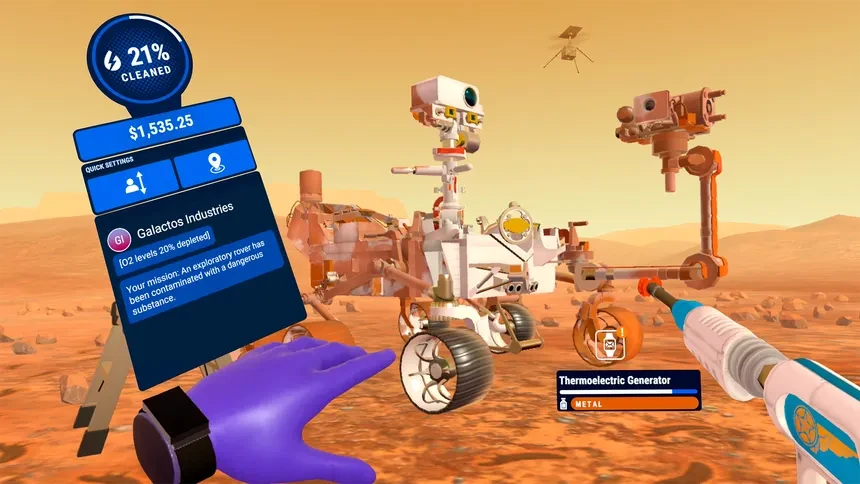
The watch open on the player’s wrist: job progress, money, quick settings and a job message. © FuturLab
I made it a pop-out watch to increase immersion. A floating menu with no clear origin looked too jarring in the headset.
The trade-off: a wrist UI is only visible when you look at it, so messages were easy to miss. I built a delayed message display system so no in-game message gets lost. Later I added a slight periodic haptic buzz on the watch hand while a message is waiting, plus a notification icon next to the washer fold-out, another piece of UI that was my idea.
Outcome
- Performance went from an unstable 20 fps to a stable 90 fps on Quest.
- PowerWash Simulator VR won Best UK Mixed Reality Game (VR, AR, XR) at the Ukie Awards 2024.
- It was a finalist for Best VR/AR/XR/MR Game at the TIGA Awards 2024.
What I learned
Converting a game to VR takes far more than setting up the VR interactions and features. A lot of the work was performance, and a lot of that was trial and error. I also learned the hard way that the zip format and compression level matter for .obb files.